

3.1 Battery Level (POWER)
Shows the current battery charge level.
🎃 Halloween Deal Sale: Up to 45% Off





Aoniu M4 LCD Display replacement works as genuine parts is backordered and will ship as soon as it is back in stock.


Final Sale — Accessories & Replacement Parts
No returns or exchanges for change of mind, ordering mistakes, or incompatible part selection.
Exceptions apply to defects, shipping damage, missing items, or incorrect items supplied by AONIU. Your rights under applicable law remain unaffected.
Please confirm compatibility before ordering. Need help? Contact us.
View Return & Refund PolicyCouldn't load pickup availability

Aoniu M4 LCD Display replacement works as genuine parts
AONIU M4
Operating instructions for the AONIU M4 electric scooter display.
| Wire | Terminal | Function |
|---|---|---|
| Red | D+ | Positive power input |
| Black | GND | Negative power input / ground |
| Blue | DS | Controller electric-lock / ignition line |
| Green | RX | Communication receive |
| White | TX | Communication transmit |
The display shows speed, battery level, fault alerts, headlight status, cruise status, gear level, total mileage, trip mileage, real-time voltage, operating current, operating time, and start mode.
When the display starts, the full screen illuminates and the software version appears within the first second.

Shows the current battery charge level.

Cycles among ODO (total mileage), TRIP (trip mileage), V (real-time voltage), A (operating current), TIME (operating time), and E (fault code).

When the warning symbol flashes, briefly press the ON/OFF button until the E screen appears. The displayed number identifies the fault.
| Code | Fault Description |
|---|---|
| ERROR 1 | Motor fault |
| ERROR 2 | Throttle fault |
| ERROR 3 | Controller fault |
| ERROR 4 | Brake cut-off lever fault |
| ERROR 5 | Undervoltage protection |
| ERROR 6 | Communication fault: the display is not receiving controller output |
| ERROR 7 | Communication fault: the controller is not receiving display output |

Units: MPH or km/h. The controller sends the motor Hall-sensor signal to the display. Using the wheel diameter and signal data, including the number of motor magnets, the display calculates actual speed. A single Hall cycle is measured in 1 ms units.

Briefly press MODE to cycle through the gear levels. A higher gear allows a higher speed. The motor does not run in Gear 0.
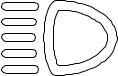
Press and hold MODE to switch on the headlight. The headlight icon illuminates on the display.

While the motor is running, hold the throttle steady for 5 seconds. The cruise icon illuminates. Release the throttle and the scooter maintains the current speed. Apply the brake, or operate and release the throttle again, to exit cruise mode.
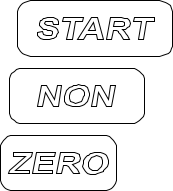
NON illuminated: non-zero start (kick-start). ZERO illuminated: zero start.

The USB icon illuminates when a cable is connected and the device draws more than 100 mA. A flashing icon indicates intermittent charging or a load above 1,000 mA; the USB port then activates protection mode.
Do not change a parameter unless you understand how it affects the scooter. Incorrect settings may affect speed display, motor behavior, or riding safety.
| Code | Setting | Options / Operation | Default |
|---|---|---|---|
| P02 | Mileage unit | 0: MPH; 1: MILE | - |
| P03 | Voltage level | 24 V / 36 V / 48 V | 48 V |
| P04 | Auto-sleep time | 0: disabled; 1-60 minutes | 5 |
| P06 | Wheel diameter | Inches; 0.1-inch precision | 10.0 |
| P07 | Speed-sensor magnets | 1-100 | 30 |
| P09 | Start mode | 0: zero start; 1: non-zero start | 0 |
| P12 | Starting torque | 0-5 (0 weakest; 5 strongest) | 5 |
| P15 | Motor drive signal percentage | Used for the P08 speed-limit function; full speed = 100 | 100 |
| P16 | Real-time cruise function | 1: enabled; 0: disabled | 0 |
| P99 | One-touch reset | On the P99 screen, hold MODE for 5-6 seconds to restore the initial factory settings | 00000 |
| d0 | Clear ODO mileage | On the ODO screen, briefly press MODE, then hold it for 5-6 seconds until the value becomes zero | 00000 |

Press and hold the Power button to turn the display on or off.
+
With the display on, press and hold the Power and MODE buttons at the same time.
In the settings screen, briefly press the Power button to cycle through parameter codes. Briefly press MODE to change the selected value. Hold MODE for 3 seconds to confirm. After all changes are complete, press and hold Power and MODE together to exit. Turn the display off and restart it to apply the changes.

aoniu
Aoniu M4 Inner Tube replacement works as genuine parts

aoniu
Aoniu M4 LCD Display replacement works as genuine parts

aoniu
Aoniu M4 Electric Lock replacement works as genuine parts

aoniu
Aoniu M4 Charger replacement works as genuine parts

aoniu
Aoniu M4 Handlebars replacement works as genuine parts

aoniu
Aoniu M4 Outer Tire replacement works as genuine parts

aoniu
Aoniu M4 Brake Pads replacement works as genuine parts

aoniu
Aoniu M4 Controller replacement works as genuine parts

This part can not be returned